

BrainVoyager QX 2.8 for Windows
To download BrainVoyager QX 2.8.4 (build 2645), click on one of the links below. If you use a 32-bit Windows operating system, chose the link ending with "_Win32.exe", if you use a 64-bit operating system (recommended), chose the link ending with "_Win64.exe". To install the program, double click the downloaded executable (.exe file) and follow the instructions of the Installation Wizard. In case you have an older version of BrainVoyager QX, close any running instance prior to installation. We highly recommend to deinstall any older version of BrainVoyager QX before running the installer. We also recommend to re-install the HASP driver during installation (in case you use a local dongle) to ensure that you use the latest driver version. If the message "Do you want to allow the following program from an unknown publisher to make changes to this computer?" appears during installation (User Account Control dialog), click "Yes", otherwise installation will not be performed.| setup_bvqx_v284_Win64.exe (181.3 MB) |  |
|
| setup_bvqx_v284_Win32.exe (179.0 MB) | |
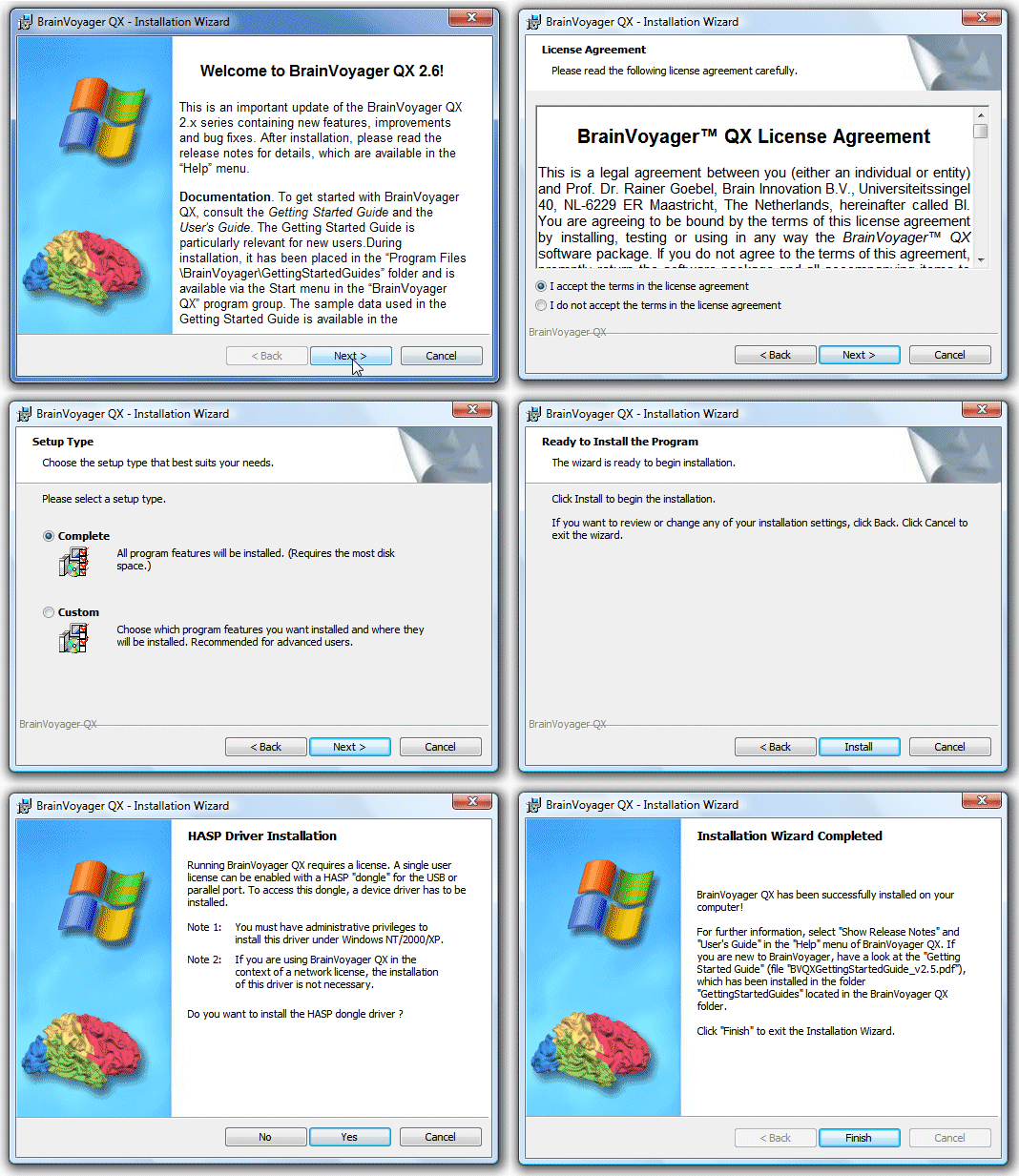
The 64-bit version of BrainVoyager QX will be installed in the "Program Files/BrainVoyager" folder and the 32-bit version in the "/Program Files/BrainVoyager32" folder reflecting that the 64-bit version is considered the default (recommended) version for Windows.
System requirements
Version 2.8 of BrainVoyager QX is fully compatible with Microsoft Windows 7, 8, and 8.1 for both 32-bit and 64-bit versions. If you get an error when launching the program after installation complaining about missing DLLs ("Application failed to start - side-by-side configuration incorrect"), please download and run the Microsoft redistributable file vcredist_x86.exe (for 32-bit Windows) or vcredist_x64.exe (for 64-bit Windows). While many operations of BrainVoyager QX run with modest working memory demands, a minimum of 2 GB is required and 4 GB recommended. To benefit from 3 or more GB of working memory as well as from OpenCL support, the 64-bit version of BrainVoyager QX is required.
Version 2.8 of BrainVoyager QX is fully compatible with Microsoft Windows 7, 8, and 8.1 for both 32-bit and 64-bit versions. If you get an error when launching the program after installation complaining about missing DLLs ("Application failed to start - side-by-side configuration incorrect"), please download and run the Microsoft redistributable file vcredist_x86.exe (for 32-bit Windows) or vcredist_x64.exe (for 64-bit Windows). While many operations of BrainVoyager QX run with modest working memory demands, a minimum of 2 GB is required and 4 GB recommended. To benefit from 3 or more GB of working memory as well as from OpenCL support, the 64-bit version of BrainVoyager QX is required.
Documentation
The User's Guide provides general help information and can be easily invoked by clicking the "User's Guide" icon in the Tool bar or by clicking the "User's Guide" item in the "Help" menu. Several PDF files introducing various topics are also placed in the BrainVoyager QX folder after installation, including the "Getting Started Guide". If you are upgrading BrainVoyager, you may want to check out the "News" section of the User's Guide. We highly recommend to read the release notes (see "Help" menu) to learn about new features, enhancements and bug fixes. The User's Guide and additional documentation is also available online. If you have any questions, suggestions or bug reports, please send an email to "support at BrainVoyager dot com".
The User's Guide provides general help information and can be easily invoked by clicking the "User's Guide" icon in the Tool bar or by clicking the "User's Guide" item in the "Help" menu. Several PDF files introducing various topics are also placed in the BrainVoyager QX folder after installation, including the "Getting Started Guide". If you are upgrading BrainVoyager, you may want to check out the "News" section of the User's Guide. We highly recommend to read the release notes (see "Help" menu) to learn about new features, enhancements and bug fixes. The User's Guide and additional documentation is also available online. If you have any questions, suggestions or bug reports, please send an email to "support at BrainVoyager dot com".
Sample data
If you want to learn basic and advanced features of BrainVoyager QX, it may be useful to start with example data sets, which are also used in our BrainVoyager QX Training Courses. The installer on this page does not contain sample data. To download example data sets, click the "Sample Data Web Page" item in the "Help" menu of BrainVoyager QX or visit the example data sets page with your Browser. The analysis of the "Objects" data set is described in detail in the BrainVoyager QX Getting Started Guide
If you want to learn basic and advanced features of BrainVoyager QX, it may be useful to start with example data sets, which are also used in our BrainVoyager QX Training Courses. The installer on this page does not contain sample data. To download example data sets, click the "Sample Data Web Page" item in the "Help" menu of BrainVoyager QX or visit the example data sets page with your Browser. The analysis of the "Objects" data set is described in detail in the BrainVoyager QX Getting Started Guide
Licensing info
Note that BrainVoyager QX works only in combination with the HASP licensing system, i.e. you need either a HASP dongle for a single user license or a HASP floating network license. Please make sure that you use the latest HASP drivers to avoid licensing problems. It is possible to upgrade your license remotely (e.g. to enable the DTI tensor calculation feature), which requires the HASP "customer.exe" software. Click here to download this executable. For further assistance contact sales _at_ brainvoyager _dot_ com.
Note that BrainVoyager QX works only in combination with the HASP licensing system, i.e. you need either a HASP dongle for a single user license or a HASP floating network license. Please make sure that you use the latest HASP drivers to avoid licensing problems. It is possible to upgrade your license remotely (e.g. to enable the DTI tensor calculation feature), which requires the HASP "customer.exe" software. Click here to download this executable. For further assistance contact sales _at_ brainvoyager _dot_ com.